

West Coast Trail Logo

West Coast Trail

Download on App Store Get it on Google Play

West Coast Trail 2026 Open Permits

West Coast Trail checks the Parks Canada revervation system every half hour and shows available quota for the 2026 season here as a free service to hikers looking for last minute permits.
West Coast Trail Reservation Day

2026 Reservation Day

Monday, January 19 @ 8am PST
Parks Canada opens West Coast Trail reservations on a specific date in January, known as reservation day. This is when thousands of hikers all try to book permits at the same time. The most popular dates often sell out within minutes.
This Open Permit Search tool usually starts working about a week after reservation day, once the initial rush has passed and cancellations or changes start to free up new openings.
  1. Set up your Parks Canada account early.
    Complete your profile (name, address, etc.) ahead of time so checkout is fast and stress-free.
  2. Get familiar with the booking system.
    Bookmark the WCT reservation page and explore it before opening day. Practice drilling into the trailheads and switching between Calendar View and List View.
  3. Be logged in and ready to GO at 8:00 AM sharp.
    Parks Canada confirmed there will be no virtual queue for 2026—it's first-come, first-served. Have the reservation page loaded, be logged into your account, and be ready to click the moment the clock hits 8:00 AM PST.
  4. Have multiple date options prepared.
    Flexibility is everything. Agree with your group ahead of time on:
    • A few possible start dates
    • Willingness to hike northbound or southbound
    This lets you react quickly without group discussion.
  5. Remember: you're only reserving your start date.
    You just need a green (available) start date. Campsites along the way are not reserved.
  6. Use Calendar View once you're in.
    It's the easiest way to see availability for both trailheads and find nearby open dates.
  7. Move quickly—but don't panic.
    Once you enter the system, you typically have 30 minutes to complete your checkout.
  8. Consider having a backup device ready.
    Have a second device (phone, tablet, or another computer) logged in and ready to go. If your primary device crashes, freezes, or loses connection, you can immediately switch to your backup without losing precious time.
If You Don't Get the Dates You Wanted
Try starting at Nitinaht.
The mid-point entry never fills up. It doesn't have to be a half-trip - you can hike north toward Pachena Lighthouse, then reverse and continue south to Gordon River for the full WCT experience. It's a fantastic—but longer—option.
Watch for cancellations.
Spots open up regularly, especially once the hiking season begins. Use this Open Permit Search tool to quickly check for newly available dates.
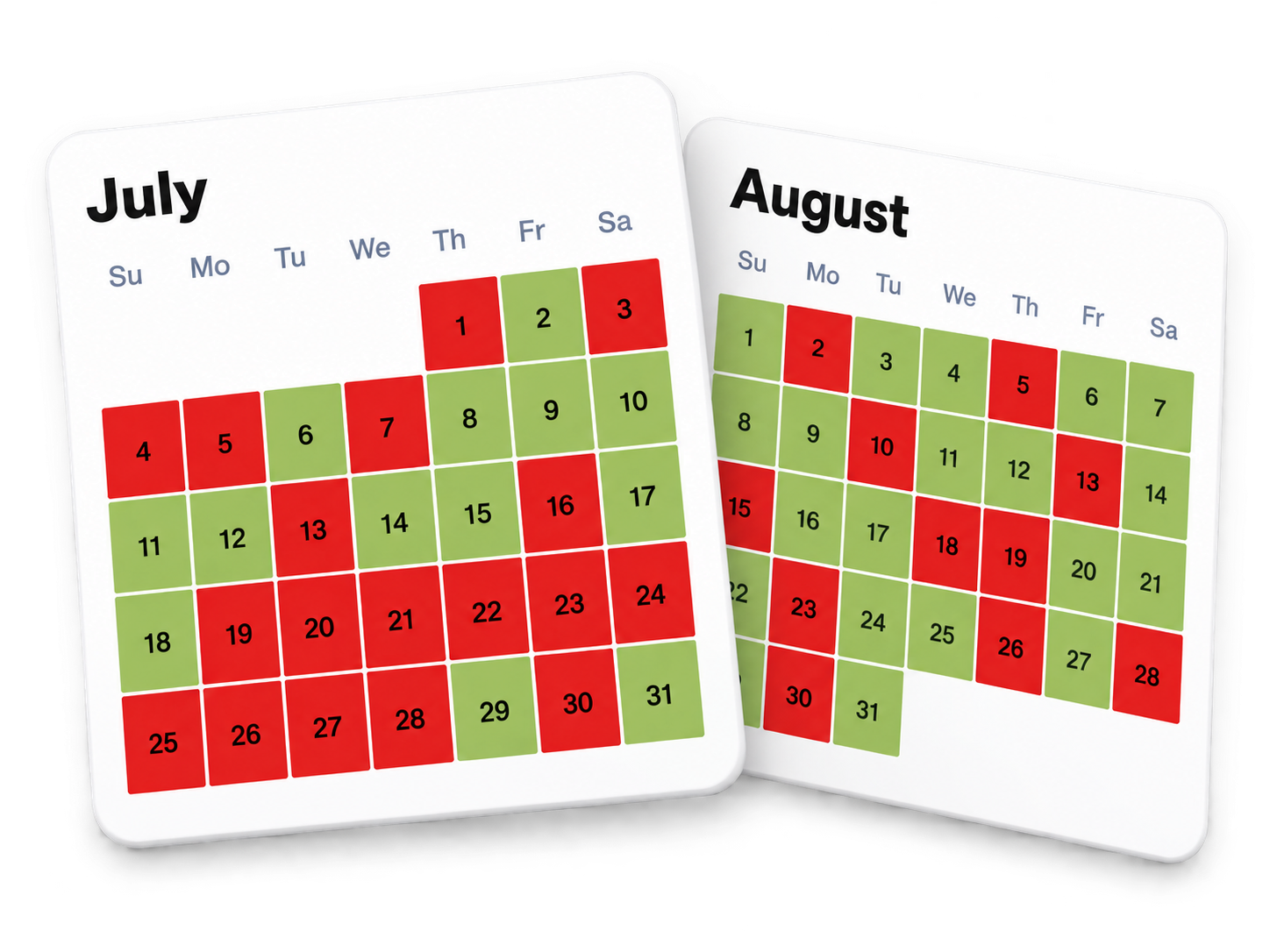
Pro Planning Tip: Pick Your Start Date Around Owen Point Tides
Owen Point is one of the trail's highlights—but only passable at low tide. Some days are red no-go days when tides make it too dangerous. Plan your start date to ensure you hit Owen Point on a safe day.
Owen Point Safe Dates Calendar
Example calendar—check West Coast Trail for the latest tides and dates based on your group's speed and direction.
Northbound (starting at Gordon River): You'll almost always reach Owen Point the day after your start date (after staying at Thrasher Cove). This makes planning straightforward—just pick a start date where the next day is green.
Southbound (starting at Pachena Bay): Timing is trickier since you may be ahead or behind schedule by the time you reach Owen Point. Choose a start date where you have green buffer days around your planned Owen Point day. Use West Coast Trail to map your itinerary and calculate the right start date.
For more information: Visit the official Parks Canada Reservation Instructions page.
Planning a trip on the West Coast Trail in 2026? Don't forget to download the FREE App!
Download West Coast Trail on Apple App StoreDownload West Coast Trail Google Play